This article gives a quick summary of the most important changes to CSV onboarding. For a more detailed guide, please see here .
Key new benefits of this system
-
Files will now be uploaded instantly, without the need for processing by CENTURY. Where there are errors, you will be notified immediately with clear instructions
-
Students can now be given custom tags
-
Students can now be allocated to year groups
-
You can choose to send emails to new users
-
You can choose either to add classes, or to overwrite them
-
Better auto-generation of usernames
Please note the following changes before use
- Please ensure you use the new templates provided. The template from the previous system will be rejected.
- When first onboarding, please check the defaults carefully. The system now defaults to 'add' classes, rather than overwriting them.
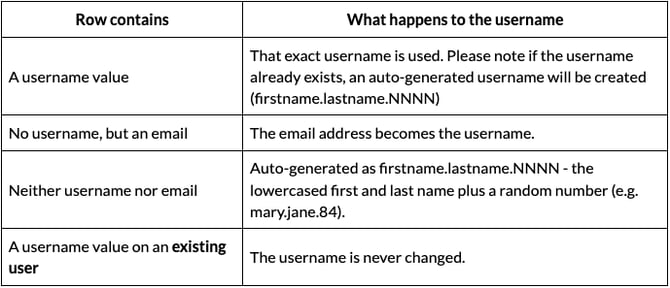
How usernames are decided
The Username column is optional. Please see below for how they are formulated:
How passwords are decided
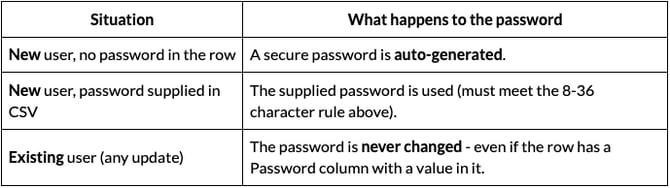
The Password column is also optional, and behaves differently for new versus existing users: